> ## Documentation Index
> Fetch the complete documentation index at: https://docs.altrum.ai/llms.txt
> Use this file to discover all available pages before exploring further.
# Guardrail Config
> Define, configure, and enforce responsible AI guardrails within your projects
## Overview
The **Guardrail Configuration** module enables users and administrators to define and manage responsible AI guardrails across projects. This ensures alignment with compliance, security, and ethical standards using AltrumAI's flexible and intuitive configuration system.
***
## Accessing Guardrail Configuration
1. From the **Home Page**, select your AI System to open the **AI System Dashboard**.
2. Click the **Edit Guardrails** button to begin editing your guardrails.
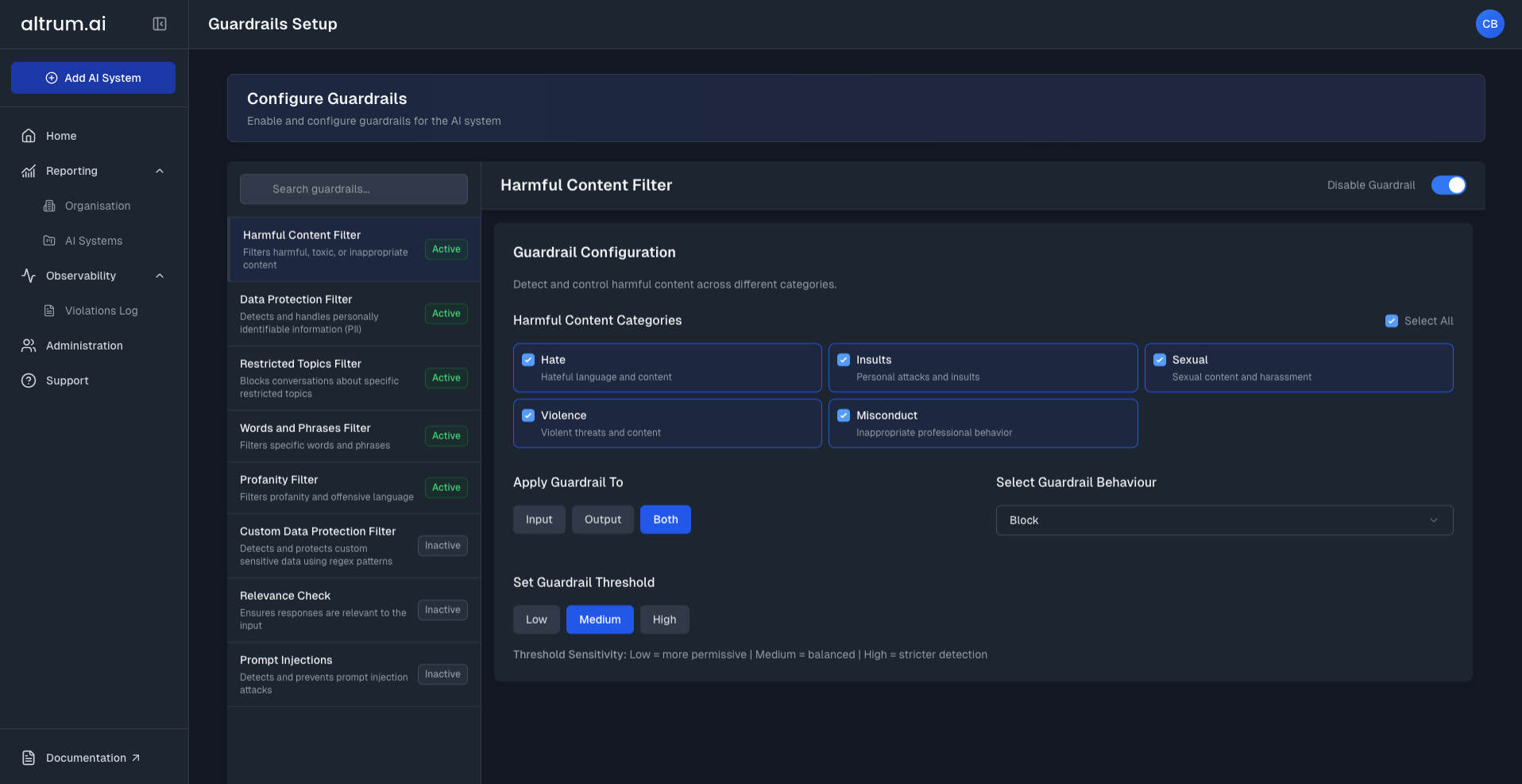 ***
### Step 1: Select a Guardrail
* Click on a guardrail from the list on the left.
* The selected guardrail's configuration options will appear on the right-hand panel.
### Step 2: Configure the Guardrail
Each guardrail has its own set of configuration options. Common configuration steps include:
* **Enable the Guardrail** using the toggle at the top of the panel.
* Choose an **Enforcement Mode**:
* **Input** – Applies the selected behaviour to what users send to the model.
* **Output** – Applies the selected behaviour to what the model returns as a response.
* Select a **Guardrail Behaviour**:
* **Monitor** – Lets you review input or output content without taking any action—used for observation and diagnostics.
* **Block** – Automatically stops content from being processed if it violates the selected guardrail rules.
* **Mask** – Replaces detected sensitive information with anonymised placeholders while allowing content to proceed (available for Data Protection and Custom Data Protection guardrails only).
* Adjust **Thresholds** (if applicable).
* Select and Configure relevant **Topics, Entities, Categories, or Words & Phrases** (depending on the guardrail type).
*For detailed instructions on each guardrail type, refer to the **Guardrails** section of the documentation.*
### Step 4: Save the Configuration
* Click **Save & Continue** to store your configuration.
* Your updates will now be saved to your AI System and ready to view in the Summary Page.
***
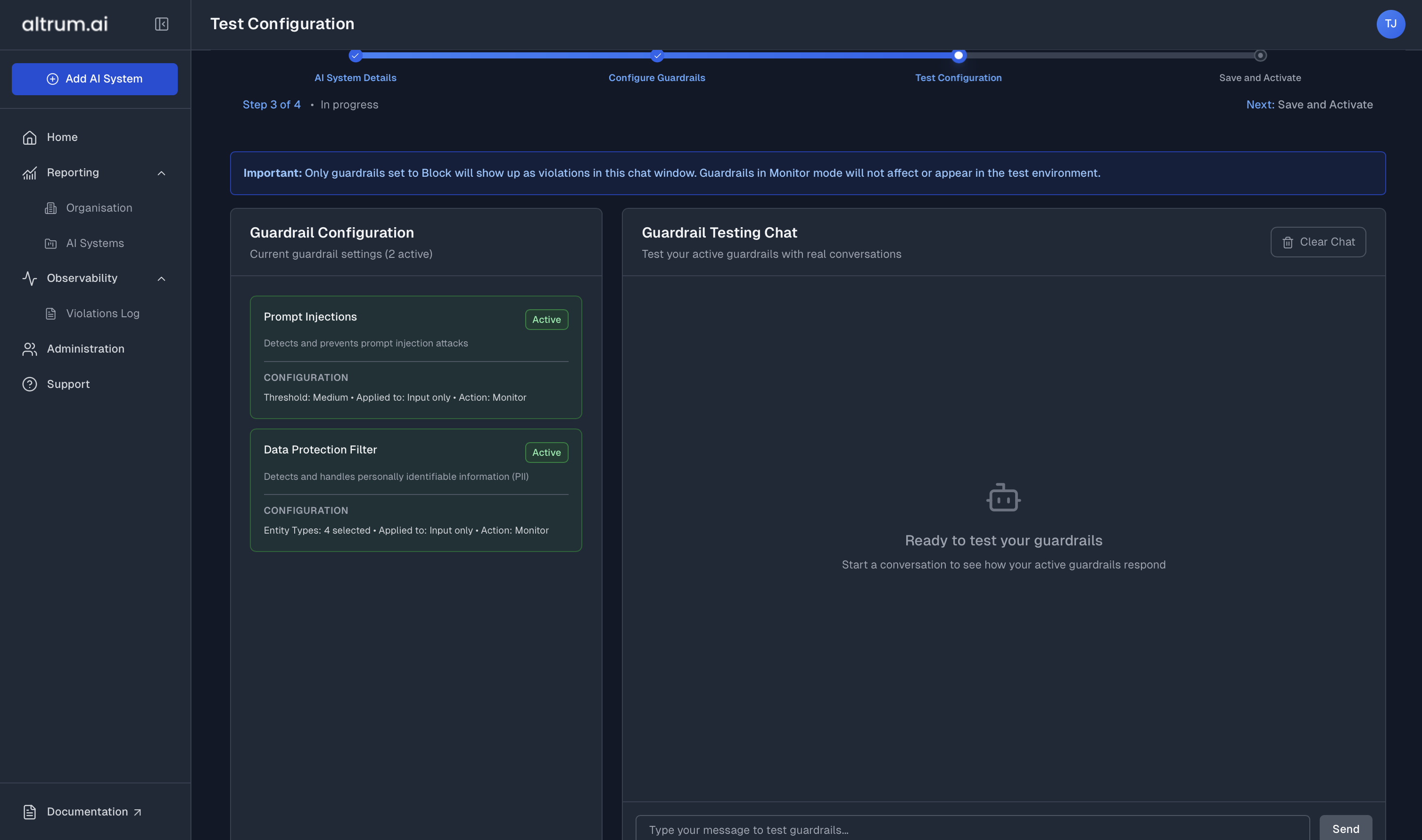
## Testing Guardrails
Once you've configured one or more guardrails, navigate to the **Test Configuration** Page.
This is a **sandbox environment** where you can:
* Interact with a test chatbot.
* See your configured guardrails in action.
* Observe how inputs and outputs are flagged & blocked in real time.
> **Note:** This is a valuable step to validate guardrail behaviour before applying changes to a live AI System.
***
### Step 1: Select a Guardrail
* Click on a guardrail from the list on the left.
* The selected guardrail's configuration options will appear on the right-hand panel.
### Step 2: Configure the Guardrail
Each guardrail has its own set of configuration options. Common configuration steps include:
* **Enable the Guardrail** using the toggle at the top of the panel.
* Choose an **Enforcement Mode**:
* **Input** – Applies the selected behaviour to what users send to the model.
* **Output** – Applies the selected behaviour to what the model returns as a response.
* Select a **Guardrail Behaviour**:
* **Monitor** – Lets you review input or output content without taking any action—used for observation and diagnostics.
* **Block** – Automatically stops content from being processed if it violates the selected guardrail rules.
* **Mask** – Replaces detected sensitive information with anonymised placeholders while allowing content to proceed (available for Data Protection and Custom Data Protection guardrails only).
* Adjust **Thresholds** (if applicable).
* Select and Configure relevant **Topics, Entities, Categories, or Words & Phrases** (depending on the guardrail type).
*For detailed instructions on each guardrail type, refer to the **Guardrails** section of the documentation.*
### Step 4: Save the Configuration
* Click **Save & Continue** to store your configuration.
* Your updates will now be saved to your AI System and ready to view in the Summary Page.
***
## Testing Guardrails
Once you've configured one or more guardrails, navigate to the **Test Configuration** Page.
This is a **sandbox environment** where you can:
* Interact with a test chatbot.
* See your configured guardrails in action.
* Observe how inputs and outputs are flagged & blocked in real time.
> **Note:** This is a valuable step to validate guardrail behaviour before applying changes to a live AI System.
 ***
## Applying Configured Guardrails
When you're satisfied with your configuration and testing:
1. Review the **Summary** page where you can:
* View all configured guardrails
* Make additional changes if required
* Update existing configurations
2. Once you're happy with all changes, click **View AI System** to return to the AI System Dashboard.
***
## Editing or Disabling Guardrails
To update or turn off a guardrail:
1. From the **AI System Dashboard**, click **Edit Guardrails** to access the Configure Guardrails page.
2. For each guardrail:
* Toggle the **Enable** button On or Off based on your required configuration
* Make any additional configuration changes as needed
3. Click **Save & Continue** to confirm your updates.
***
## Best Practices
* Start with **Monitor** mode to observe behavior without disruption.
* Use the **Test Guardrails** page to validate before applying changes.
* Regularly review violation logs and refine configurations as needed.
* Apply stricter enforcement to regulated or high-risk AI Systems.
***
## Next Steps
Analyse guardrail violation data and performance trends.
Update roles and permissions to align with guardrail responsibilities.
***
## Applying Configured Guardrails
When you're satisfied with your configuration and testing:
1. Review the **Summary** page where you can:
* View all configured guardrails
* Make additional changes if required
* Update existing configurations
2. Once you're happy with all changes, click **View AI System** to return to the AI System Dashboard.
***
## Editing or Disabling Guardrails
To update or turn off a guardrail:
1. From the **AI System Dashboard**, click **Edit Guardrails** to access the Configure Guardrails page.
2. For each guardrail:
* Toggle the **Enable** button On or Off based on your required configuration
* Make any additional configuration changes as needed
3. Click **Save & Continue** to confirm your updates.
***
## Best Practices
* Start with **Monitor** mode to observe behavior without disruption.
* Use the **Test Guardrails** page to validate before applying changes.
* Regularly review violation logs and refine configurations as needed.
* Apply stricter enforcement to regulated or high-risk AI Systems.
***
## Next Steps
Analyse guardrail violation data and performance trends.
Update roles and permissions to align with guardrail responsibilities.